
Donnerstag, 18. Oktober 2007
Simple Java ReverseIterator to iterate in reverse order
Unfortunately the post has been lost due to a spam/defacement attack.

Freitag, 2. März 2007
Integrating Freemind documents into Alfresco
I'm currently trying out the open source document management system Alfresco. I anticipate Alfresco becoming a widely used open source product in the field of enterprise document management much like typo3 is currently for web CMSes. To get to know it I decided to run it on a debian server and throw some of my documents on it. The CIFS (a integrated samba server) makes it easy to access the files over the windows network while still being versioned and access controlled in the repository.
The main reason I'm writing this post though is, that I'd like to share how I integrated freemind mindmaps into Alfresco. The freemind mindmaps are .mm-files which can already be stored in alfresco but are "unknown binary" files. What we have to do is tell alfresco what .mm-files are by defining them as mime-types. The Alfresco wiki describes how to add a mime-type so I did this accordingly:
<alfresco-config area="mimetype-map">
<config condition="Mimetype Map" evaluator="string-compare">
  <mimetypes>
    <mimetype display="Freemind"
      mimetype="application/x-freemind">
      <extension>mm</extension>
    </mimetype>
  </mimetypes>
</config>
</alfresco-config>
The result of including the preceding xml files as tomcat\shared\classes\alfresco\mimetype\mimetype-custom-extensions.xml is that the new content type Freemind appears in the Add Content Dialog.
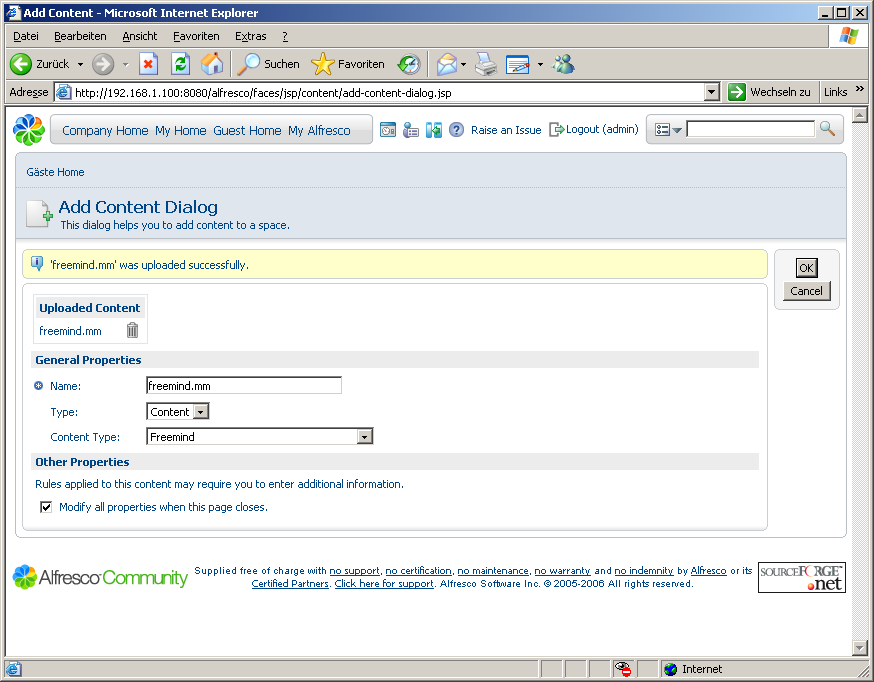
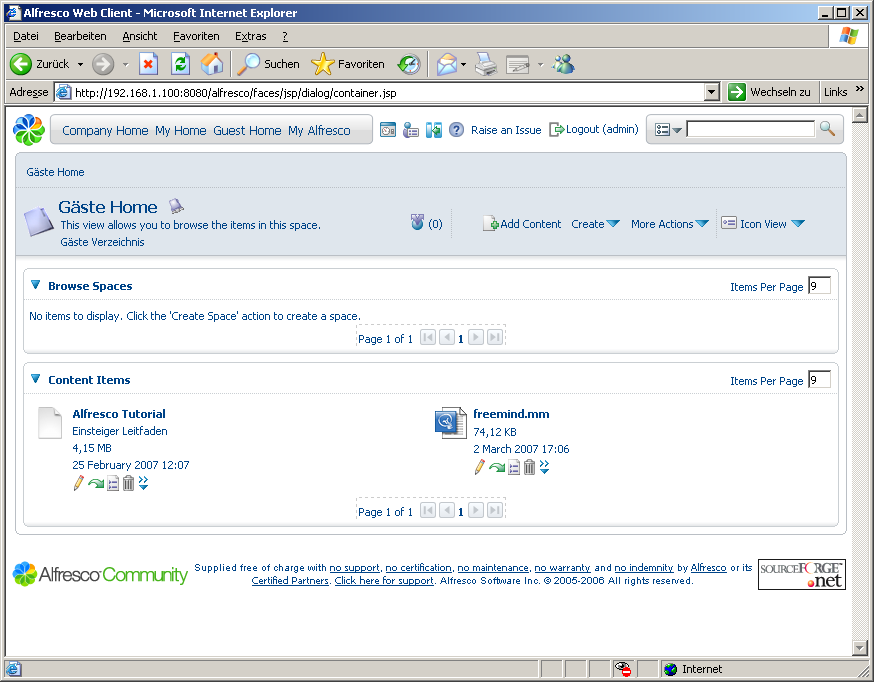
The next step would be adding the icons for the freemind documents. To achieve this you simply have to copy a file named mm.gif into the alfresco/images/filetypes (16x16 pixels) and alfresco/images/filetypes32 (32x32 pixels) folder in the web application. The new file is automatically recognized after a restart of the web-app and the new icon is available.
Then I thought it would be nifty to have a preview of the mindmap right in the web interface. Fortunately freemind provides a java applet and a flash viewer. I decided to use the flash viewer and found the alfresco templates as a extremely easily way to integrate custom display logic. For my viewer I would only have to include the html code to open the flash object in a freemaker template. Alfresco provides a template directory within the data dictionary (a space in the repository) where I included the following code in the file freemind.fts:
<#if document?exists>
<div id="flashcontent" style="height: 500px;">
         Flash plugin or Javascript are turned off.
         Activate both  and reload to view the mindmap
</div>
<script type="text/javascript" src="/alfresco/custom/freemind/flashobject.js"> </script>
<script type="text/javascript">
        var fo = new FlashObject("/alfresco/custom/freemind/visorFreemind.swf", "visorFreeMind", "100%", "100%", 6, "#9999ff");
        fo.addParam("quality", "high");
        fo.addParam("bgcolor", "#ffffff");
        fo.addVariable("openUrl", "_blank");
        fo.addVariable("initLoadFile", "/alfresco${document.url}");
        fo.addVariable("startCollapsedToLevel","5");
        fo.write("flashcontent");
    </script>
<#else>
   No document found!
</#if>
This is basically the code that freemind generates when exporting to flash. More information on templates can also be found in the alfresco wiki in the Template Guide. The template can be easily edited right from the web interface:
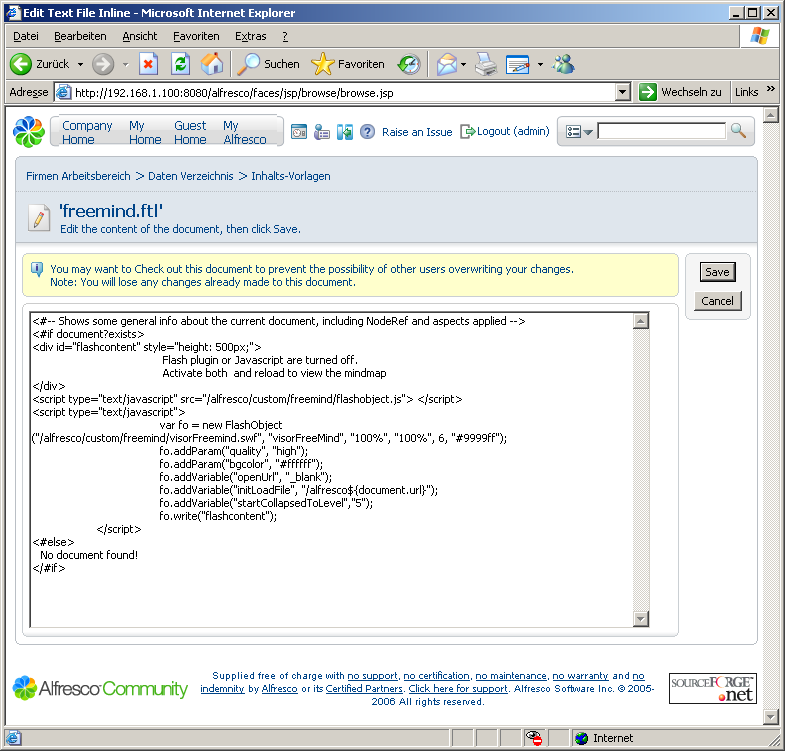
This templates refers to a javascript and the flash viewer which I stored in the web application under alfresco/custom/freemind. The fixed height of 500px, which I included, is not the best to solution but is needed to prevent the window from collapsing to a very small area.
Using this template as a custom view in the details page of the mindmap file, which we added earlier, produces this interactive preview of the mindmap:
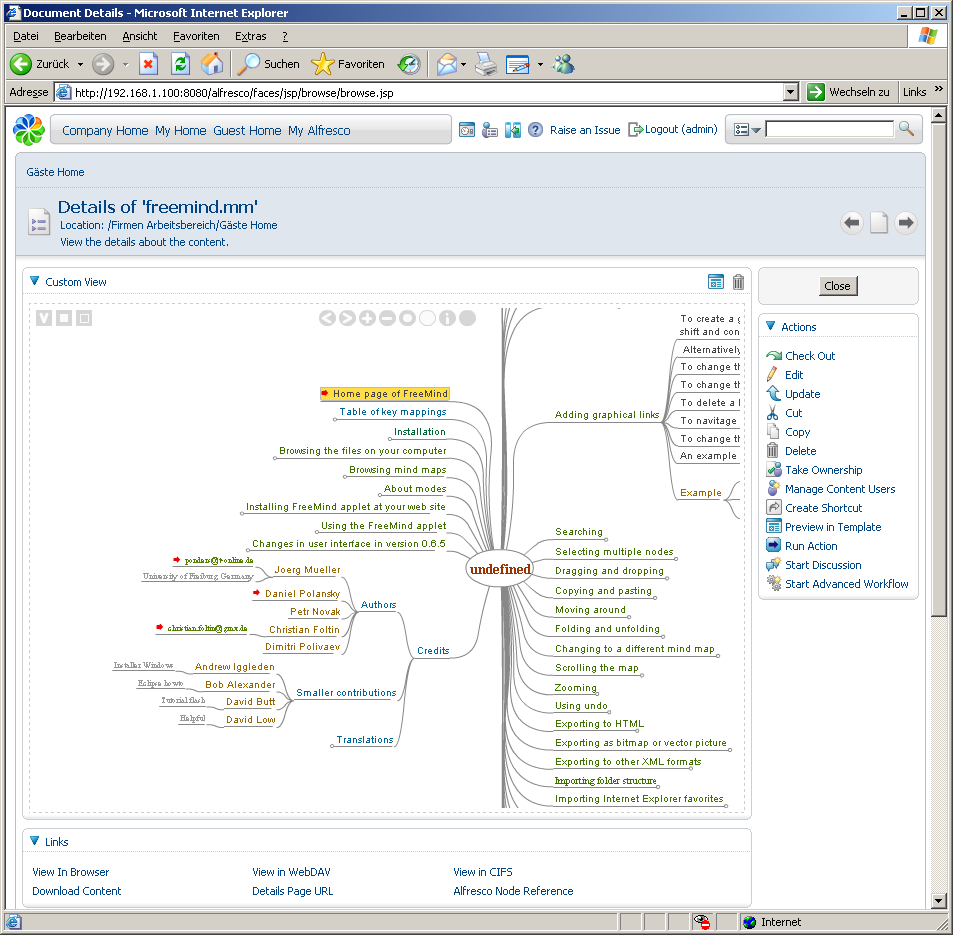
Using "Preview in Template" the viewer can also be used without the menu on the right:

This little customization has took me not much longer than writing this post which is pretty amazing. Most if the impressiveness of the result is due to the ready-to-use functionality of the freemind flash viewer though ;-)
Anyway it shows that the templates are a very powerful feature of Alfresco and allow to create custom views without a lot of friction as they allow the integration of arbitrary applets, flash objects or even external sites via iframes. For now I'm pretty happy with alfresco and look into deploying it more solidly on my home-server and look into backup options.
Donnerstag, 4. Januar 2007
Preserving the state in dynamic asp.net usercontrols
Phew 2007... my new years resolution includes writing more posts, but you know how these things go ;-)
I recently struggled with the ascx user controls in asp .net v1.1. My problem was that when creating user controls dynamically, the state was not preserved between postbacks and at first I couldn't figure out why. Once I understood the process of the asp .net page request completely by reading through this informative article Understanding ASP.NET View State I finally figured out the two essential things you have to do:
When I finally got that, I developed a modified PlaceHolder-Control, which encapsulates the dynamic loading and reloading of viewstate enabled user controls. I currently don't have a decent version to post here, though.
Btw, I just updated the SQL Script Creator project page with a slightly changed version 1.0.1 and also uploaded the source code. The program is now officially open sourced under the GPL.
I recently struggled with the ascx user controls in asp .net v1.1. My problem was that when creating user controls dynamically, the state was not preserved between postbacks and at first I couldn't figure out why. Once I understood the process of the asp .net page request completely by reading through this informative article Understanding ASP.NET View State I finally figured out the two essential things you have to do:
- Specify IDs for the dynamic controls. If you just use Page.loadControl() and add the control to the page without defining it's id, .net will not be able to save and restore it's viewstate - so the ID is essential.
- Recreate the user control on every page load (post back). Even though .net stores the viewstate information when you provided the ID, the user controls will not survive a post back - this is by design. So it's your responsibility to recreate your user controls on page load which means you have to know the control (path to ascx-file) with it's corresponding ID and restore those. An example can be found in the aspnet4you article Dynamic Loading of User Control with ViewState Preserved.
When I finally got that, I developed a modified PlaceHolder-Control, which encapsulates the dynamic loading and reloading of viewstate enabled user controls. I currently don't have a decent version to post here, though.
Btw, I just updated the SQL Script Creator project page with a slightly changed version 1.0.1 and also uploaded the source code. The program is now officially open sourced under the GPL.
Abonnieren
Posts (Atom)