Dienstag, 24. Januar 2006

Windows freeware for commercial use

When developing software at work you might be restricted to what software you can install and use. You might even work at a client's computer where you don't want to risk using trial versions for months and violate licenses. This is where Open Source software really pays off, it's just free.

Unfortunately, when searching for free software you often find shareware applications or even worse, freeware for personal use only. That's why I started compiling the following list that contains great freeware and open source apps that allow commercial use. (A link here is no guaranty that commercial use is granted. Licenses can change or I could have made a mistake - check the licenses and EULAs!)


Browser / Web


Mail-Client


FTP-Client


Text and XML-Editors


Diagnostics / System Utils


Archiver


Backup


Media Player


File-Manager


  • FreeCommander Windows filemanager similar to Total Commander

  • XPlorer basically a windows explorer with tabs


CD/DVD Recording


Terminal / SSH / Remote-Control


Messaging


Web-Development


Linux Tools / XWindows


  • Cygwin - a complete linux like environment, including shell, services and X.


Version Control


  • Subversion version control system, sucessor to CVS

  • TortoiseSVN windows client for subversion as explorer integration


Imaging / Graphics


Visualization / UML


  • ArgoUML Java Tool to create UML diagrams

  • StarUML Windows UML ß MDD Tool

  • FreeMind a free mind mapping software like Mindjet's Mindmanager


Office


Development Environments


  • Visual Studio Express Express Editions of MS Visual C++, C#, VB and SQL Server

  • PHP Designer 2006 PHP Development Environment (eula says personal use, but several forum posts say commercial use granted)


*Missing*


  • good image viewer with thumbnail view

  • a complete burning appliction (like Nero or K3B)


I realize that this list is far from complete - I basically started with apps I like to use or think they might be useful for me. Especially if you look for development tools there are a lot more useful apps out there - I deliberately neglected the whole field of java development tools, since most of them are already commercially usable.


This list will be updated whenever I find new apps - I would appreciate any suggestions you might have for additions to this list.

Montag, 23. Januar 2006

Coming up...

Another evening thats much too short... anyway I'd like to share whats coming up in the next days:


  • I still have no approval to release the third party code within PhpWebChecksum as part of the php file. I'll probably have to rewrite the two or three php functions myself before I release it.


  • Besides that, I subversioned my MyDocuments folder to have an archive and a backup of my documents. Expect an article on how to set up subversion with svn+ssh authentication because I realized that most pages that address this issue are incomplete or not very easy to understand.


  • The other thing I'm working on is a list of windows freeware applications that can be used commercially. Most freeware lists don't pay attention to the license restriction "for personal use only" - but you might. If you want to install software at work without violating the licenses you can find good free tools in the list I'm compiling.

Sonntag, 15. Januar 2006

Creating reflection effects with Photoshop actions


A very popuplar and really cool looking effect is the illusion of reflective surfaces. You can see this reflection effect on many popular websites, in apple's itunes or right here in this picture of a Ferrari 355. Although there is a way to create such an image reflection just with javascript and the canvas tag this effect will usually be done by image editing as long as Internet Explorer doesn't support the magical canvas tag. Therefore I will show you in the following tutorial a way to automate the creation of the reflection using actions in Adobe Photoshop.

Samstag, 14. Januar 2006

New look


I finally finished my wordpress customizing and updated the site with a new theme. What you see here is a K2 r160 theme with customized CSS and the additional images. The only thing I had to change in the PHP scripts was the display of the categories in the sidebar which was limited to certain pages. So the upgrade to the next K2 release will hopefully be seamless. The archives page doesn't work at the moment but I'll have a look at that in the upcoming week.


Here is a screenshot of the new design for documentation purposes:
new design techbits.de based on K2 r160

Mittwoch, 11. Januar 2006

PhpWebChecksum to be released soon


The first version of my php script to monitor changes in your website will be released soon. I already set up a sourceforge account for PhpWebChecksum which will be mainly used for bugtracking, and maybe source code management (CVS) and file storage for releases for now. The projects homepage will be hosted on techbits.de under /projects/phpwebchecksum which is already available as well. At this point I have to make sure I can use Keith Devens' PHP XML Library which I included in my php script and figure out how I'll solve the pass-by-reference issue when switching between PHP4 und PHP5.


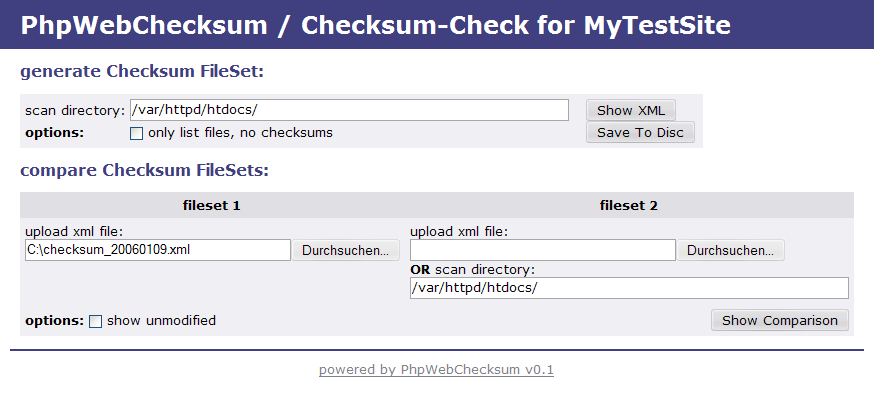
Here is another teaser screenshot of the main form with header, footer and some design improvements:


main form with some design improvements

Donnerstag, 5. Januar 2006

Checking websites for intrusions


When I recently installed this blog a thought about how you could monitor a website for intrusions. Almost all sites use some kind of content management system, blog or other portal software. Unfortunately we all know that software does have flaws an that there are script kiddies out there who do not hesitate to exploit them as soon as they are found. Since most of the small sites and blogs are hosted on simple PHP/MySQL webspace it is not as easy to monitor the integrity of your site when the web application has hundreds of files buried deep in a directory hierarchy and you only have FTP access to browse through it.


I googled for tools that create checksums for websites but I didn't find much, so I started on creating a PHP application for that that purpose. My prototype has the following functionality:


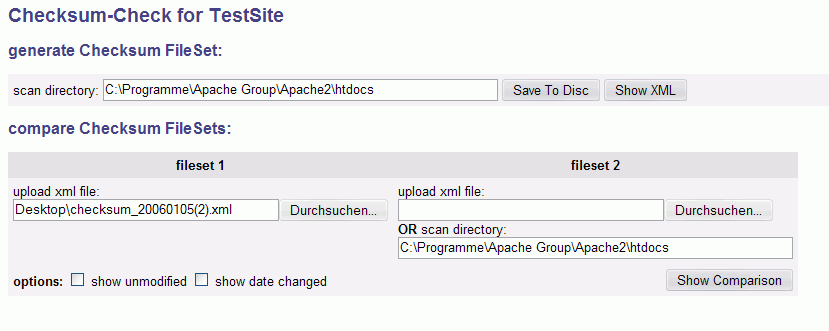
  • generating an xml list with checksums (SHA1) and file dates for a complete directory tree
  • the xml list can be downloaded to be stored locally
  • the xml checksum list can later be uploaded to be compared against the current state of the website
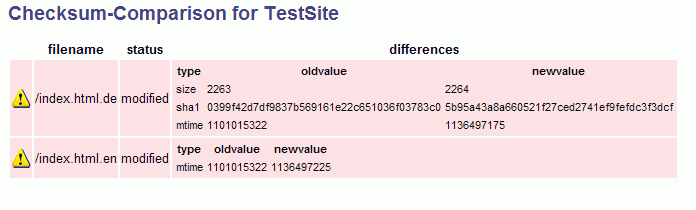
  • a comparison is computed and display showing all modified, new and missing files with the information what (date, size, checksum) has been modified.


Here are two screenshots that show the current development version:

Main Form - generate and compare checksumsChecksum Comparison View


I will continue working on this tool and make it available as open source when it's fairly stable.

Dienstag, 3. Januar 2006

Extending the blog


I have just installed the tagging plugin Ultimate Tag Warrior for Wordpress to easily add some technorati tags to this blog. It provides a tag editor within WordPress' Write Post page to associate tags with the post and it even suggests tags for the post you have written. The tags for each post can be displayed as links to different services like technorati or flickr (and more) and build up to a tag cloud that can be used to dig through your post archive. A Very useful plugin.


I've been playing around with the recent K2 Beta Two in the last few days - it supports Ultimate Tag Warrior out of the box by the way. The Beta Two looks really nice, the new icons and the ajaxified comments dialog are particularly noteworthy. I still have some image editing and css hacking to do until I'll update the theme here, maybe with the next (beta?, rc?) release of K2.